THJCC 2026 CTF Writeup

CTF Event Info
| CTF Organizer | CTF Team | CTFTime URL | CTF Platform |
|---|---|---|---|
| Taiwan High School Joint Cyber Championship | KSAL Cyber Team | ctftime.org/event/3088 | ctf2026.thjcc.org |
This was my first CTF, and of course I had guests over at the same time... so I didn’t get to do much. I mostly stuck to forensics and steganography since they’re easier to work on (not really but still).
I ended up solving these two:
- CoLoR iS cOdE (forensics / steganography)
- SSTV Audio Challenge (signal-based steganography using SSTV)
Challenge 1 - CoLoR iS cOdE
Challenge Information
| Challenge Name | Category | Points | Artifact | Hint |
|---|---|---|---|---|
| CoLoR iS cOdE | forensics / steganography | 500 | THJCC_CoLoR_iS_cOdE.zip | colors can say a lot |
1. Inspect the ZIP file
The first thing I saw was the password-protected ZIP file.
At 500 points, brute-forcing didn't make much sense, so I was already thinking:
- either crypto is weak
- or there's some trick
To confirm what was inside, I ran:
import zipfile
z = zipfile.ZipFile("THJCC_CoLoR_iS_cOdE.zip")

for i in z.infolist():
    print(i.filename, bool(i.flag_bits & 0x1), i.file_size)
The output showed:
- Entry:
rainbow.png - Encrypted:
True
So it was using classic ZIP encryption, most likely ZipCrypto, not AES. That’s important because ZipCrypto is weak.
2. Known-Plaintext Attack
Since the archive only contained a PNG, I immediately remembered:
- PNG files always start with the same magic header.
PNG header: 89504e470d0a1a0a0000000d49484452
That means we already know the first bytes of the plaintext. So I thought:
- If this is ZipCrypto, I can recover the internal keys using a known-plaintext attack.
I used bkcrack:
.\bkcrack\bkcrack-1.8.1-win64\bkcrack.exe `
  -C THJCC_CoLoR_iS_cOdE.zip `
  -c rainbow.png `
  -x 0 89504e470d0a1a0a0000000d49484452
It successfully recovered the internal keys:
- d3b0bb05 2e88b90e ed7f7e33
That confirmed my suspicion. It was vulnerable ZipCrypto.
3. Decrypt Archive
Now that I had the internal keys, I didn’t need the password anymore.
.\bkcrack\kcrack-1.8.1-win64\bkcrack.exe `
  -C THJCC_CoLoR_iS_cOdE.zip `
  -k d3b0bb05 2e88b90e ed7f7e33 `
  -D THJCC_CoLoR_iS_cOdE_decrypted.zip
After extraction, I finally had access to:
- rainbow.png
Now the real puzzle started.
4. EXIF Payload (Ook -> Brainfuck)
Opening the PNG normally didn’t immediately reveal anything.
So I inspected its structure and metadata.
Inside the eXIf chunk, I found a long UserComment string written entirely in Ook. Ook? Ook! ....
That’s not random. That’s Ook, a language equivalent to Brainfuck.
At that point my thinking was:
- Okay, this is deliberate.
- If it’s Ook, it probably decodes to something meaningful.
I mapped Ook instruction pairs to Brainfuck operations and executed the decoded program.
The result was:
THJCC{c0lorfU1_col0rfu!_c0That’s part of the flag but incomplete.
So I knew the image must contain another layer.
5. Pixel Frequency Encoding
The hint said: colors can say a lot.
So I zoomed into the image and noticed a structured top band made of colored blocks. It wasn’t random. There were:
- 26 vertical columns
- Each column was 12×12 pixels
That looked extremely intentional. So my hypothesis was:
- Each column probably encodes one ASCII character
I tested that idea by:
- Counting the frequency of each color in a column
- Ignoring black
- Taking the most frequent non-black color
- Converting that count to ASCII
That worked. It produced:
!0rful_img_m4d3_by_p1e7:>}That confirmed the encoding logic was correct.
Final Flag
Combining both parts:
THJCC{c0lorfU1_col0rfu!_c0!0rful_img_m4d3_by_p1e7:>}Challenge 2 - SSTV Audio Challenge
Challenge Information
- Artifact: output.flac
- Duration: ~115 seconds
- Sample Rate: 48000 Hz
- Channels: Mono
Step 1 — Initial Inspection
The file was:
- output.flac - about 115 seconds long.
My first thought was:
- Maybe spoken audio?
- Maybe morse?
- Maybe spectrogram art?
So I tried direct transcription:
from mutagen.flac import FLAC

f = FLAC("output.flac")
print("length", f.info.length)
print("sample_rate", f.info.sample_rate)
print("channels", f.info.channels)
print("tags", dict(f.tags) if f.tags else {})
It returned:
length 3.713832199546485
sample_rate 22050
channels 1
tags {}import speech_recognition as sr
r = sr.Recognizer()
with sr.AudioFile("output.flac") as source:
audio = r.record(source)
print(r.recognize_google(audio))It returned:
- TV 459 amazing sound
TV seemed like a hint but nothing practically useful.
Step 2 — Spectrogram Analysis
When audio doesn’t make sense audibly, I always check the frequency domain.
Installed matplotlib:
python -m pip install matplotlibThen generated a spectrogram:
import matplotlib
matplotlib.use('Agg')
import matplotlib.pyplot as plt
import soundfile as sf
x, sr = sf.read('output.flac')
plt.figure(figsize=(18,6))
plt.specgram(x, NFFT=2048, Fs=sr, noverlap=1024, cmap='magma')
plt.ylim(900, 2500)
plt.tight_layout()
plt.savefig('spectrogram_900_2500.png', dpi=180)
It generated this spectrogram:
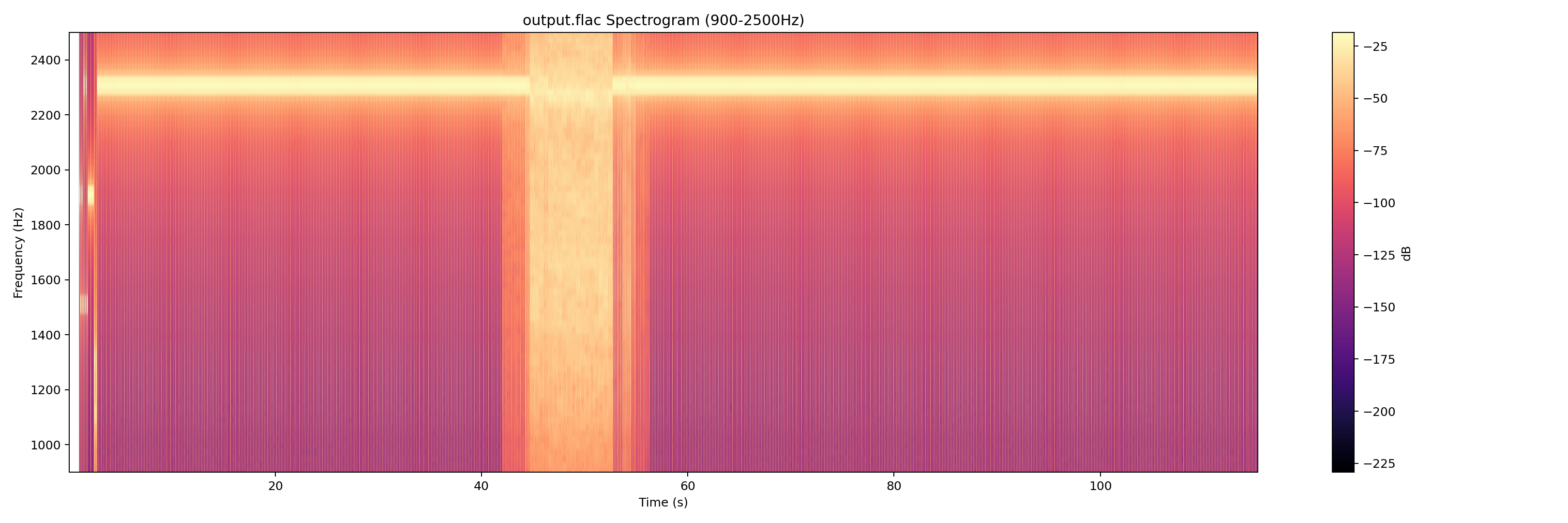
The moment I saw the structured horizontal tone patterns between 900–2500 Hz, I thought:
- That looks like SSTV (Slow-scan television).
And once you see SSTV patterns, you can’t unsee them.
Step 3 — SSTV Decoder
I installed an SSTV decoder:
python -m pip install git+https://github.com/colaclanth/sstv.gitTried CLI:
sstv -d output.flac -o decoded.pngBut Windows threw a terminal handle error. So instead of wasting time debugging the CLI, I switched to using the Python API directly.
Step 4 — Forcing Modes
Automatic VIS detection returned unsupported code (26). That meant either:
- Corrupted VIS
- Custom mode
- Or detection failure
So I brute-forced common SSTV modes:
from sstv.decode import SSTVDecoder
import sstv.decode as dec
from sstv import spec

dec.log_message = lambda *a, **k: None
dec.progress_bar = lambda *a, **k: None

modes = [
    ('M1', spec.M1), ('M2', spec.M2), ('S1', spec.S1),
    ('S2', spec.S2), ('SDX', spec.SDX), ('R36', spec.R36), ('R72', spec.R72)
]

for name, mode in modes:
    d = SSTVDecoder('output.flac')
    h = d._find_header()

    if h is None:
        print(name, 'no header')
        continue

    d.mode = mode
    vis_end = h + round(spec.VIS_BIT_SIZE * 9 * d._sample_rate)
    img_data = d._decode_image_data(vis_end)
    img = d._draw_image(img_data)
    out = f'decoded_forced_{name}.png'
    img.save(out)
    print(name, 'saved', out)
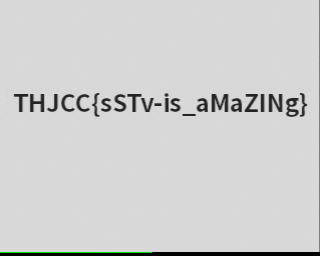
Mode M1 produced a clean readable image. That confirmed the hypothesis.
Final Flag
THJCC{sSTv-is_aMaZINg}